Three cards.Three dates.One clear picture.
All your spending, together. Import your statements and see the month clearly — entirely on your phone.
Available on iOS · Android coming soon
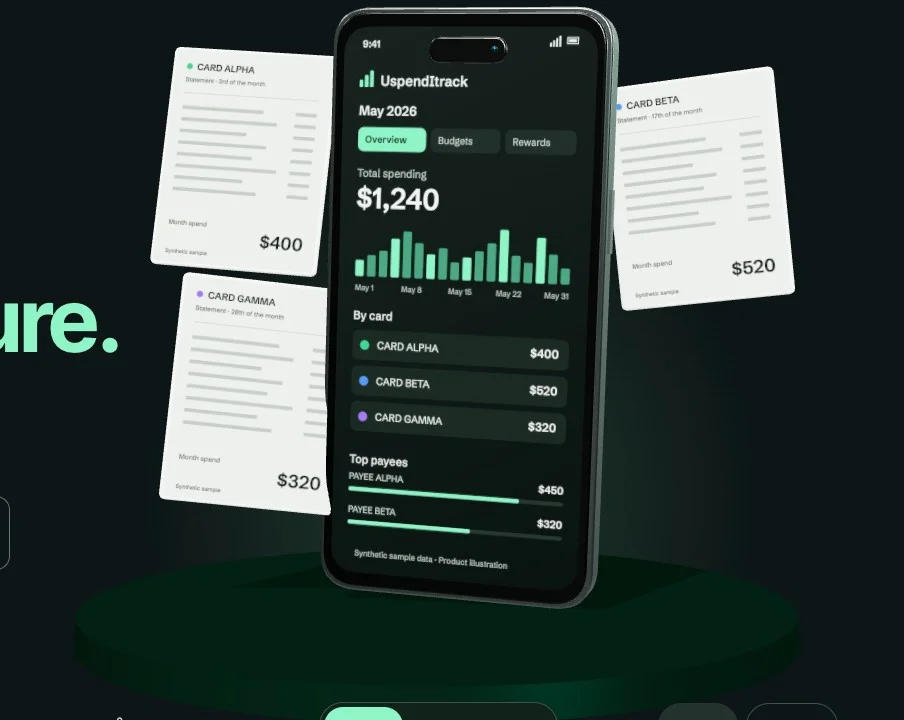
Product preview
Interactive product illustration · Synthetic sample data
Synthetic sample: $1,240 total. Card Alpha $400, Card Beta $520, Card Gamma $320.
Loading interactive product preview.
Separate statements. One monthly view.
Most people carry three or four. Each statement arrives on its own date, in its own format, with nothing sorted into anything — so working out what you actually spent last month means opening all of them and adding it up yourself.
Every card. One month.
Separate statements become one calendar-month spending view.
As the statements arrive
On one calendar month
Import each statement and every card lands on one shared timeline, so there is a single dashboard across all of them instead of three PDFs and a calculator.
Categories are applied automatically by rules you control, because statements arrive with none. Re-importing one you already have adds nothing, and overlapping periods are handled for you.
Handing over every card at once is only reasonable if nothing goes anywhere. That claim is stated precisely further down.
Three steps, none of which involve us.
The entire loop runs on the device in your hand. There is no step where your data crosses a network, because there is no network code that could carry it.
01
Open a statement
Pick the PDF your bank already gives you. The app reads it on the phone — no upload, and no OCR service in the middle.
02
It sorts itself out
Transactions are categorised, grouped by merchant and summarised by month. Re-importing a statement you already have adds nothing.
03
See where it went
Dashboard, monthly view, cashflow heatmap, category breakdowns, budgets, and subscriptions worked out from your own history.
March 2026
$2,140.60
A full spending tracker, with the cloud removed.
Dropping the server was the only compromise. Everything else is here.
Statement PDFs, parsed on device
Built-in support for common Singapore formats including DBS, OCBC, UOB, Citibank and PayLah. Every import is checked against the total printed on the statement, so you find out when something did not add up.
Any other bank, via CSV/PDF
Drop the PDF in first — a statement from an unfamiliar bank may still parse. Otherwise export CSV from your bank and import that. If the headers are unfamiliar, the app asks which column holds the date, the description and the amount — then remembers it for next time.
Bulk editing
Select many transactions and recategorise, annotate or mark them recurring in one go.
Recurring & subscriptions
Group a recurring expense that arrives under a different name each month, and see what it really costs a year.
Budgets per category
Set a plan, compare month to month, and see what is left before the month ends rather than after.
Card spend and rewards
Spending broken out by card, with the cashback and miles rates you set yourself.
Snapshots you can restore
Taken automatically as well as on demand, and kept on the device with everything else.

Nothing in here leaves the device
There is no server to trust, so you do not have to trust us.
The app contains no code that transmits financial data anywhere. There is no backend, no account, no sync, no analytics and no crash reporting. The only network activity in the binary is Apple's and Google's own purchase verification, which sees a product identifier and nothing else.
Your ledger is excluded from iCloud and Google device backup, so it does not reach your own cloud account either. On Android that is checkable from the listing itself: the app ships no internet permission beyond what the store's billing library requires.
This page carries no analytics, no third-party scripts and no fonts from anyone else's server, for the same reason. The artwork beside this is served from this domain like everything else on it.
One purchase. No subscription.
The purchase gates importing beyond five statements, and nothing else — ever. Viewing, editing, categorising, budgets, reports and CSV export are free on both tiers.
Free
$0
Five statement imports
- Every screen and every feature
- Full editing, rules and budgets
- CSV export, unrestricted
- Anything already imported stays usable forever
Unlimited imports
$5.99
One-time purchase, permanent. Local pricing may vary.
- Import as many statements as you like
- Works offline once purchased
- Restore through your App Store account
- No renewal, no upsell
Android is not out yet. This page will link it the day it is.
The awkward ones, answered.
What happens when I get a new phone?
It starts empty. Because nothing is stored in a cloud, your data moves across with a backup file: export one in Settings → Backups on the old phone, then restore it in Backups on the new one — no account required. That is the cost of the promise, and we would rather state it here than have you discover it later.
My bank is not in Singapore. Does it work?
Through CSV/PDF, yes. The built-in PDF parsers cover common Singapore formats; a statement from an unfamiliar bank may still parse, but CSV is the path that reliably works everywhere. The app tells you plainly when it cannot read a PDF rather than importing something wrong.
Can you look at my data to help with a problem?
No — and that is the point of the app rather than a limitation of the support channel. Your data only exists on your phone. Please do not email statements or screenshots containing real transactions.
Is my statement uploaded anywhere to be read?
No. The PDF is parsed by code running inside the app on your device. There is no OCR service, no AI model and no server involved. Categorisation is rules-based and also runs locally.
Why is there no free trial of unlimited imports?
Five free imports is the trial. It is enough to load several months of statements and see real charts before deciding, and whatever you import in that window stays fully usable whether or not you ever buy anything.
Still have a question?
Write to hello@uspenditrack.com. There is no ticketing system and no chatbot — the reply comes from the person who wrote the app.